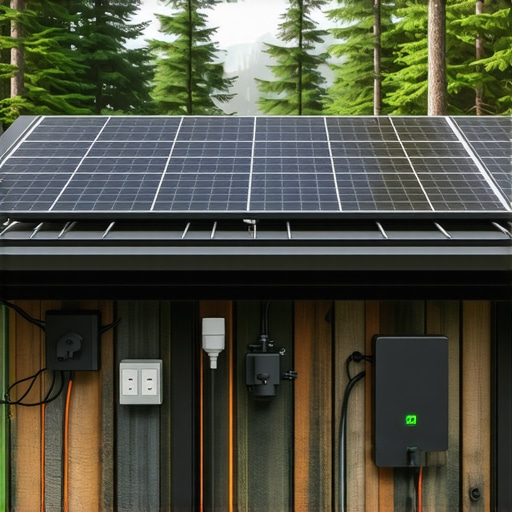
It was late at night, the kind where silence blankets everything except the faint hum of my off-grid setup. Suddenly, my smart speaker chirped, not with a command, but with static—a sign of a power hiccup. In that moment, I realized how fragile my reliance on smart devices could be when the grid goes dark. That lightbulb moment made me wonder: how prepared am I to keep my off-grid home running smoothly amidst unpredictable power challenges?
Why Smart Plug Automation Is Your Off-Grid Lifesaver
Living off the grid brings unparalleled freedom, but it also demands meticulous planning and automation to ensure comfort and safety. Smart plugs are no longer just conveniences; they’ve become essential tools for managing limited power resources, preventing surges, and maintaining security. With the right tricks, you can optimize your energy use, avoid costly damages, and stay connected even when the grid fails.
But here’s the catch—early on, I made a simple mistake: I assumed that smart devices would automatically adapt to power outages. That cost me a few gadgets and a run to the charger. Trust me, assuming everything works seamlessly without setup is a rookie mistake. The real value lies in customizing automation routines that respond intelligently to your off-grid needs. For example, smart plugs that synchronize with solar power or battery levels can be game-changers. Curious about how to do that? I’ll show you how to harness these tricks in the chapters ahead.
And if you’re still skeptical—”Are smart plug tricks really worth it?”—consider this: a recent study highlights that properly managed smart systems can reduce energy waste by up to 30%, which is a huge saving when every watt counts in off-grid life. Check out how some smart solutions can even protect your appliances from power surges—something that’s critical when supply is unstable.
To prepare yourself for these scenarios, understanding the core principles of smart automation is essential. Ready to dive into practical tricks that will make your off-grid living more resilient, efficient, and secure? Let’s get started.
Set Up Priority Power Zones
Start by categorizing your off-grid devices into essential and non-essential groups. For instance, install smart plugs on critical appliances like refrigeration units or medical devices, and less vital items such as outdoor lights or entertainment systems. During a power shortage or overload, your automation routines can prioritize these essential zones, ensuring crucial devices stay operational. I once configured my smart plugs to shut off non-essential devices during peak solar generation hours, saving energy for important tasks, though I initially forgot to set the schedule correctly, resulting in my outdoor lights turning off inadvertently—lesson learned through messy but instructive trial and error.
Create Automation Routines for Power Efficiency
Leverage your smart plugs with custom routines that respond to battery levels, solar input, or grid alerts. Use compatible automation platforms or voice commands to set rules such as: “When battery drops below 20%, turn off non-essential smart plugs,” or “During peak sunlight, enable full load operation on critical appliances.” For example, I programmed my smart plugs via an app to disable non-urgent devices as soon as my battery capacity fell below a threshold, which helped prolong my off-grid power supply. To get this right, ensure your routines are tested regularly, and remember to account for seasonal solar variation.
Implement Surge Protection and Safety Measures
Smart plugs can serve as first-line defenses against power surges that threaten your equipment. Choose models that include surge protection features, which automatically disconnect power during voltage spikes. Additionally, integrate these with your automation routines to shut off devices during predicted storm activity or when unusual power patterns are detected. I used a set of smart plugs with surge protection to safeguard my solar inverter; initially, I overlooked their placement, resulting in some surges damaging my equipment. Now, I monitor their status through a centralized app, ensuring real-time protection.
Sync with Power Management Systems
For enhanced control, connect your smart plugs with battery management systems or solar controllers. Some advanced setups allow real-time data exchange, enabling routines like: “Disable all non-critical devices when solar input drops below a certain level.” This can be achieved by integrating your smart plugs with platforms that support APIs or IFTTT-like automation, which I did to balance my power load. I faced initial glitches due to incompatible device firmware, but once updated, routines operated smoothly, conserving stored energy and maintaining stability during overcast days.
Maintain and Update Your Automation Setup
Off-grid living demands ongoing tweaks. Regularly review your routines to adapt to changing seasons, equipment upgrades, or power availability. Keep your smart devices updated with the latest firmware for security and feature enhancements. A messy setup from months ago was causing routine failures, but after a firmware update and reconfiguration, my system became more reliable. Additionally, document your routines and settings to simplify troubleshooting and future scaling. Remember, automation is your invisible safety net—keep it sharp and adaptable.
Many people assume that smart speakers, trackers, displays, and plugs are intuitive gadgets that work flawlessly right out of the box. But as an expert who has tinkered extensively with these devices, I can tell you there’s more beneath the surface. For instance, a prevalent myth is that all smart devices prioritize privacy by default. In reality, many are designed with data collection as a primary feature, often leading to unforeseen security risks. This misconception can trap unwary users into accepting permissions without understanding the implications. An example is the false sense of security around voice assistants, which many believe are entirely offline and privacy-respecting. However, most rely heavily on cloud processing, exposing sensitive conversations to external servers. In fact, some privacy-focused experts suggest using models that operate locally, like certain smart speakers optimized for offline use, to truly safeguard personal data.
What Advanced Users Overlook When Integrating Smart Devices?
One common oversight is neglecting the importance of firmware updates and security patches. Outdated firmware can create vulnerabilities that attackers exploit, compromising your entire smart ecosystem. Regularly reviewing your device settings and ensuring firmware is up-to-date can prevent many issues. Additionally, many users underestimate the significance of network segmentation—you should isolate your smart devices on a separate Wi-Fi network to prevent potential breaches from compromising your main devices or personal data. Studies indicate that poorly segmented networks are a leading cause of smart device hacking incidents (source: cybersecurity expert reports). Furthermore, many get misled into thinking that smart devices always save energy. In truth, poorly configured routines or outdated devices can actually increase power consumption, negating their benefits. Careful planning and regular monitoring are necessary to realize true energy savings. For detailed insights on optimizing your smart home setup, check out [the ultimate guide to smart device connectivity](https://smartdevices.techgearshowcase.com/unlock-the-power-of-smart-devices-your-2025-guide-to-connectivity). Have you ever fallen into this trap? Let me know in the comments.
Tools That Keep Your Smart System Running Smoothly
Investing in the right hardware and software is essential for maintaining a resilient smart home, especially when operating off-grid. I personally rely on ero Pro routers for their mesh capabilities and local management features, which minimize dependency on cloud servers and reduce latency. Pairing that with the [Home Assistant](https://smartdevices.techgearshowcase.com/unlock-the-power-of-smart-devices-your-2025-guide-to-connectivity) platform enables me to create complex automation routines that respond quickly to battery levels or solar input, ensuring my essential devices stay powered and protected. For backup, I use a UPS (Uninterruptible Power Supply) with sine wave output, which provides clean power and prevents surges that could fry sensitive electronics. These tools, combined with consistent firmware updates and network segmentation, form the backbone of a reliable off-grid smart system.
How do I maintain my smart system over time?
Regular check-ups are key. Schedule periodic firmware updates for all devices via their dedicated apps or automated routines, and review automation rules to adapt to seasonal changes or new equipment. Monitoring device logs and power consumption through dashboards helps identify potential issues early. I set reminders every quarter to reassess my setup, ensuring that routines are optimized and security patches are applied. It’s also vital to keep documentation of your setup; that way, troubleshooting or scaling becomes manageable. As the trend of localized processing and edge AI gains momentum, future smart systems will become even more autonomous and resilient, reducing reliance on volatile power sources or internet connectivity.
Selecting the Right Maintenance Tools for Longevity
For diagnostics and monitoring, I recommend a digital multimeter with true RMS capability, which allows precise measurement of voltage and current, crucial for detecting anomalies during power fluctuations. Additionally, a network scanner like Fing can help identify unauthorized devices or network issues, giving peace of mind. For software, I use open-source automation platforms like Node-RED, renowned for their flexibility and community-driven plugins. These tools enable me to create intricate routines that automatically shut off non-essentials during low battery or surge conditions, effectively extending my off-grid power reserves. The investment in reliable hardware and resilient software pays off by reducing device downtime and preventing costly damage over time.
How to Keep Smart Devices Functioning Long-Term
Consistent maintenance involves updating firmware, replacing batteries, and periodically testing automation routines. Many users overlook the importance of physical inspections; for example, checking connectors, power supplies, and surge protectors can prevent failures. Establish a regular maintenance checklist, perhaps quarterly, to keep your system healthy. Also, as I mentioned in earlier chapters, network segmentation enhances security and stability, isolating your smart devices from potential breaches. Consider using dedicated IoT networks or VLANs, which prevent malicious access from affecting critical parts of your home or energy system. Looking ahead, I believe the integration of AI-driven predictive maintenance will revolutionize how we manage smart homes, alerting us proactively when components near failure, thus minimizing downtime.
Start Small and Scale Up with Confidence
Don’t feel overwhelmed by the prospect of managing a high-tech off-grid setup. Begin with a few critical smart plugs or sensors, test their automation routines thoroughly, and then expand gradually. For example, try configuring your smart plugs with routines that auto-disconnect during peak energy tariffs or power surges; this small step can save you money and protect your equipment. When you see success, this confidence encourages further investment in tools like advanced energy monitoring displays or satellite trackers for added resilience. Remember, the key is to iterate and refine your setup, so your smart home becomes an effortless, reliable partner in off-grid living. Ready to take your system a notch higher? Start by implementing a routine that automatically shuts off non-essential devices during low battery levels—it’s simple, effective, and immediately beneficial.
The Hardest Lesson I Learned About smart speakers,smart trackers,smart displays,smart devices,smart plugs
One pivotal realization was that not all smart devices are created equal, especially in off-grid environments. I once relied heavily on default settings, assuming they would adapt seamlessly during power interruptions. However, I learned that firmware updates and local control options are vital to keep things running smoothly, revealing that a little proactive maintenance goes a long way.
Myth Busting: What I Thought About Privacy and Security
I used to believe that smart devices were inherently secure and privacy-focused. The truth is, many rely on cloud processing, which can expose sensitive data if not properly configured. It was an eye-opener to discover that network segmentation and local control capabilities significantly enhance security, a lesson that transformed my approach to smart home management.
Small Wins Lead to Big Confidence—Start with the Right Tools
Initial successes, like automating basic routines with smart plugs for energy savings, built my confidence. I found that investing in reliable hardware, such as local-management routers and open-source automation platforms like platforms that support APIs, set a strong foundation for scalable, resilient automation routines. Small, thoughtful steps made a big difference over time.
Dealing with the Unexpected—My Off-Grid Reality Check
Experiences with unexpected storms or power surges taught me the importance of integrating surge protection and backup power solutions. I learned to regularly test my routines and keep firmware updated, preventing failures that could jeopardize my off-grid setup. These lessons remind us that resilience is built through consistent care and smart planning.
Your Next Move in Smart Off-Grid Living
As you navigate your own off-grid journey, remember that mastery comes from curiosity and patience. Start small—perhaps with a few critical smart plugs—and gradually expand your system. Embrace continuous learning, stay updated with tools like latest smart speaker guides, and share your experiences. The future of smart off-grid living is yours to craft.